Contents
- Index
GoldVisionPro™ Link Center Analyze Links
NOTE: Version 6.5.1 The Analyze feature is available with the VisionDex Tool Pak (requires additional licensing).
Analyze Existing File Links
GoldVisionPro™ is a very powerful tool to be sure that all of the files in the database are located in the place where it is actually stored. The analysis of these links and the ability to clean up existing links created prior to the implementation of GoldVisionPro™, and the ongoing ability to check other linked files such as e-mail attachments, faxes or any other GoldMine® linked record.
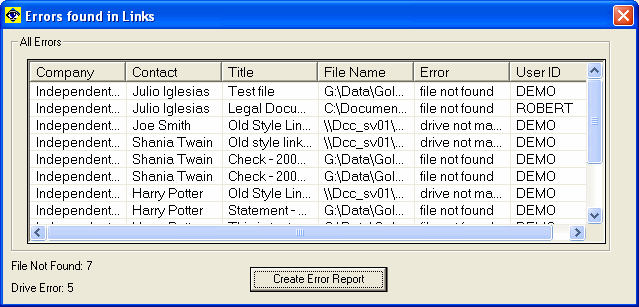
When there are errors found in the Linked Documents Database, they will be displayed in this screen.
·
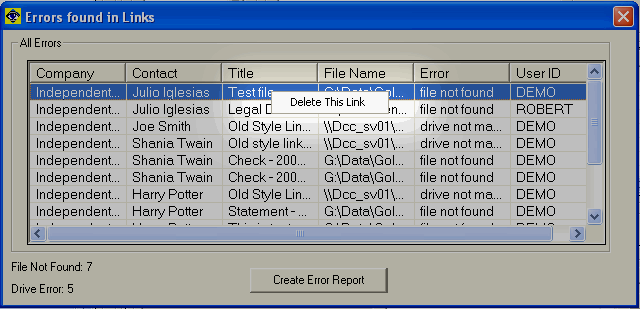
Users with MASTER rights will be allowed to delete the link information from this display by performing a right-mouse-click on the selected file.
·
All of these errors can be selected and put into a report. Press the Create Error Report button and all the data displayed will be copied into the Clipboard. From there, a user can paste the data into notepad or into a spreadsheet to view the errors and manage the installation as required.
·
*Note: The analysis of the files is from the perspective of the workstation in which this process was run. Therefore, if an error exists, it is important to validate where and why before taking action such as deleting a linked document. System administrators are strongly recommended to create backups before performing this action.
Previous Step: GoldVisionPro™ Link Center Actions
Next Step: Hints and Tips about Analyzing
SEE ALSO
Analyzing Hints and Tips
GoldVisionPro™ Link Center Overview
Administration Overview
© 1999-2003 GoldVisionPro™ - All Rights Reserved.

The GoldMine® Trademark is used by permission from FrontRange Solutions, Inc.